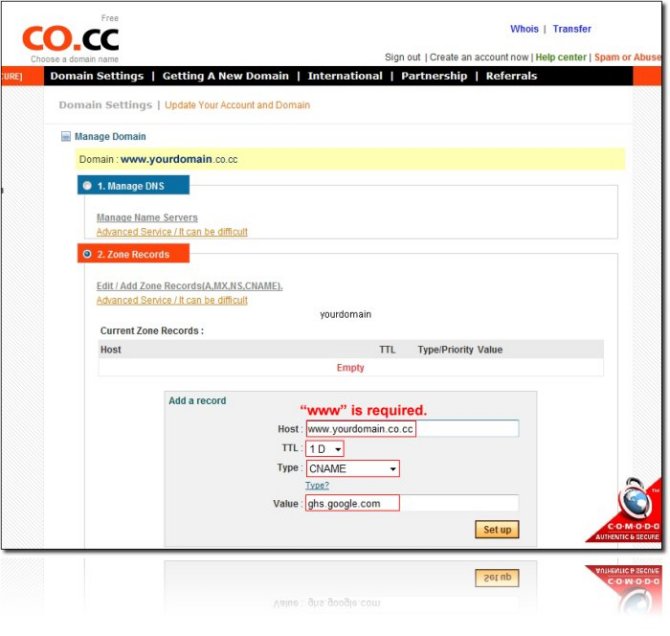
Step 0. What you need to Get started. - co.cc domain name - blogger.com Account Step 1. Co.cc ? Log-in your account ?Domain Settings ? Select domain ? Click "Set up" box ? Zone Records ? Add record as below
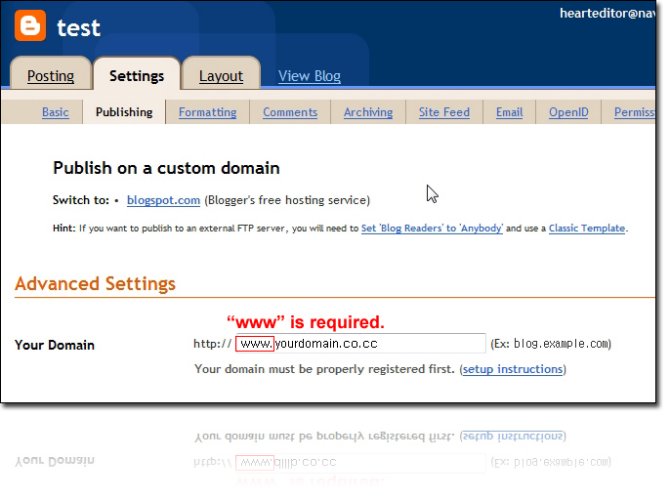
Step 2. Blogger ? Log-in your account ? Settings ? Publishing ? Click "Custom Domain" link ? Click "Switch to advanced settings" link ? Enter your co.cc domain name as below ? Fill in the blank ? Save settings
Step 3. All you need to do is wait for 48 hours! Generally, it takes about 48 hours for the CNAME changes to propagate over the Internet.