How to change files and folders permissions?
All popular FTP clients have options for changing the permissions of files and folders.
This option can be usually found in the popup menu after clicking with the right mouse button on files / folders.
You should check the manual for your FTP client for more information.
Instructions:
Permission Modes
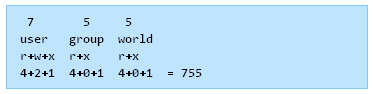
The permission mode is computed by adding up the following values for the user, the file group, and for everyone else. The diagram shows how.
- Read 4 – Allowed to read files
- Write 2 – Allowed to write/modify files
- eXecute1 – Read/write/delete/modify/directory
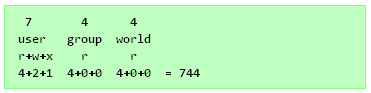
Example Permission Modes
Mode Str Perms Explanation 0477 -r–rwxrwx owner has read only (4), other and group has rwx (7) 0677 -rw-rwxrwx owner has rw only(6), other and group has rwx (7) 0444 -r–r–r– all have read only (4) 0666 -rw-rw-rw- all have rw only (6) 0400 -r——– owner has read only(4), group and others have no permission(0) 0600 -rw——- owner has rw only, group and others have no permission 0470 -r–rwx— owner has read only, group has rwx, others have no permission 0407 -r—–rwx owner has read only, other has rwx, group has no permission 0670 -rw-rwx— owner has rw only, group has rwx, others have no permission 0607 -rw—-rwx owner has rw only, group has no permission and others have rwx
Related Posts
Related Posts |