starting with HTML + CSS (Step 3: adding fonts)
Another thing that is easy to do is to make some distinction in the fonts for the various elements of the page. So let's set the text in the “Georgia” font, except for the h1 heading, which we'll give “Helvetica.”
On the Web, you can never be sure what fonts your readers have on their computers, so we add some alternatives as well: if Georgia is not available, Times New Roman or Times are also fine, and if all else fails, the browser may use any other font with serifs. If Helvetica is absent, Geneva, Arial and SunSans-Regular are quite similar in shape, and if none of these work, the browser can choose any other font that is serif-less.
In the text editor add the following lines:
<!DOCTYPE html PUBLIC "-//W3C//DTD HTML 4.01//EN"><html><head> <title>My first styled page</title> <style type="text/css"> body { font-family: Georgia, "Times New Roman", Times, serif; color: purple; background-color: #d8da3d } h1 { font-family: Helvetica, Geneva, Arial, SunSans-Regular, sans-serif } </style></head><body>[etc.]If you save the file again and press “Reload” in the browser, there should now be different fonts for the heading and the other text.
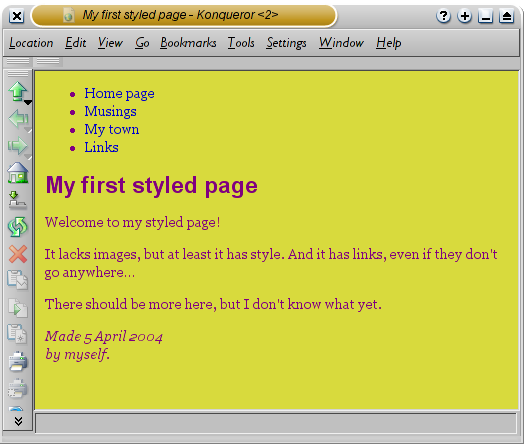
Now the main text has a different font from the heading.
Step 1 | Step 2 | Step 3 | Step 4 | Step 5 | Step 6 | Step 7
(W3)
Related Posts
Related Posts |