starting with HTML + CSS (Step 7: putting the style sheet in a separate file)
We now have an HTML file with an embedded style sheet. But if our site grows we probably want many pages to share the same style. There is a better method than copying the style sheet into every page: if we put the style sheet in a separate file, all pages can point to it.
To make a style sheet file, we need to create another empty text file. You can choose “New” from the File menu in the editor, to create an empty window. (If you are using TextEdit, don't forget to make it plain text again, using the Format menu.)
Then cut and paste everything that is inside the <style> element from the HTML file into the new window. Don't copy the <style> and </style> themselves. They belong to HTML, not to CSS. In the new editor window, you should now have the complete style sheet:
body { padding-left: 11em; font-family: Georgia, "Times New Roman", Times, serif; color: purple; background-color: #d8da3d }ul.navbar { list-style-type: none; padding: 0; margin: 0; position: absolute; top: 2em; left: 1em; width: 9em }h1 { font-family: Helvetica, Geneva, Arial, SunSans-Regular, sans-serif }ul.navbar li { background: white; margin: 0.5em 0; padding: 0.3em; border-right: 1em solid black }ul.navbar a { text-decoration: none }a:link { color: blue }a:visited { color: purple }address { margin-top: 1em; padding-top: 1em; border-top: thin dotted }Choose “Save As…” from the File menu, make sure that you are in the same directory/folder as the mypage.html file, and save the style sheet as “mystyle.css”.
Now go back to the window with the HTML code. Remove everything from the <style> tag up to and including the </style> tag and replace it with a <link> element, as follows:
<!DOCTYPE html PUBLIC "-//W3C//DTD HTML 4.01//EN"><html><head> <title>My first styled page</title> <link rel="stylesheet" href="mystyle.css"></head><body>[etc.]
This will tell the browser that the style sheet is found in the file called “mystyle.css” and since no directory is mentioned, the browser will look in the same directory where it found the HTML file.
If you save the HTML file and reload it in the browser, you should see no change: the page is still styled the same way, but now the style comes from an external file.
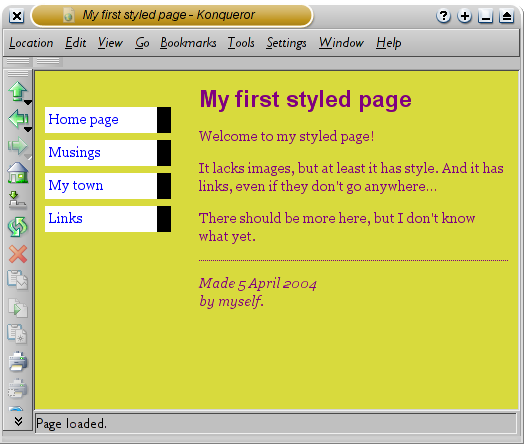
The final result
The next step is to put both files, mypage.html and mystyle.css on your Web site. (Well, you might want to change them a bit first…) But how to do that depends on your Internet provider.
Step 1 | Step 2 | Step 3 | Step 4 | Step 5 | Step 6 | Step 7
(W3)
Related Posts
Related Posts |